Quickstart
The Internet radio toolchain
Liquidsoap is a general audio stream generator, primarily intended for Internet radios. Before diving into the Liquidsoap tutorial, let's quickly go over the components of the internet radio toolchain for those who may not be familiar with it.
The chain is made of:
- the stream generator (Liquidsoap, ices, or for example a DJ-software running on your local PC) which creates an audio stream (Ogg Vorbis or MP3);
- the streaming media server (Icecast, HLS (via a HTTP server), ...) which relays several streams from their sources to their listeners;
- the media player (iTunes, VLC, a web browser, ...) which gets the audio stream from the streaming media server and plays it to the listener's speakers.
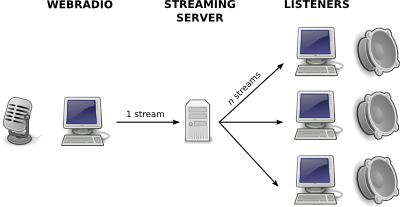
The stream is always passed from the stream generator to the server, whether or not there are listeners. It is then sent by the server to every listener. The more listeners you have, the more bandwidth you need.
If you use Icecast, you can broadcast more than one audio feed using the same server. Each audio feed or stream is identified by its "mount point" on the server. If you connect to the foo.ogg mount point, the URL of your stream will be http://localhost:8000/foo.ogg -- assuming that your Icecast is on localhost on port 8000. If you need further information on this you might want to read Icecast's documentation. A proper setup of a streaming server is required for running Liquidsoap.
Now, let's create an audio stream.
Starting to use Liquidsoap
We assume that you have a fully installed Liquidsoap. In particular, the library stdlib.liq and its accompanying scripts must be installed — otherwise Liquidsoap won't have access to the operators defined there.
Sources
A stream is built with Liquidsoap by using or creating sources. A source is a media stream containing audio and/or video, track marks and metadata. In the following picture we represent a stream which has at least three tracks (one of which starts before the snapshot), and a few metadata packets (notice that they do not necessarily coincide with new tracks).

Liquidsoap provides many functions for creating sources from scratch (e.g. playlist), and also for creating complex sources by putting together simpler ones (e.g. switch in the following example). Eventually, sources are plugged into outputs (typically named output.*) which continuously pull the source's content and output it to speakers, to a file, to a streaming server, etc. These outputs are what bring your sources to life.
That source is fallible!
A couple of things can go wrong in your streaming system. In Liquidsoap, we say that a source is infallible if it is always available. Otherwise, it is fallible, meaning that something could go wrong and the source would not be available. By default, an output requires that its input source is infallible, otherwise it complains that "That source is fallible!"
For example, a normal playlist is fallible.
First, it could contain only invalid files, or spend too much time on invalid
files to prepare a valid one in time.
It may also contain remote files that are not always reachable.
A queue of user requests is another example of fallible source.
Also, if file.ogg is a valid local file,
then single("file.ogg") is an infallible source.
When an output complains about its source being fallible, you have to turn it into
an infallible one. Many solutions are available.
The function mksafe takes a source and returns an infallible
source, streaming silence when the input stream becomes unavailable.
In a radio-like stream, silence is not the preferred solution, and you
will probably prefer to fallback on an infallible
"security" source:
fallback([your_fallible_source_here, single("failure.ogg")])
How fallback hands over between the two — right away or at the end of a track,
with a fade or without — is decided by the sources themselves. See
source composition.
Finally, if you do not care about failures, you can pass the parameter
fallible=true to most outputs (or pass the option --no-fallible-check to Liquidsoap). In that case, the output
will accept a fallible source, and stop whenever the source fails
and restart when it is ready to produce data again.
One-line expressions
Liquidsoap is a scripting language. Many simple setups can be achieved by evaluating one-line expressions.
Playlists
In the first example we'll play a playlist. Let's put a list of audio files in
playlist.pls: one filename per line, lines starting with a # are
ignored. You can also put remote files' URLs, if your liquidsoap has
support for the corresponding protocols.
Then just run:
liquidsoap 'output(playlist("playlist.pls"))'
Other playlist formats are supported, such as M3U and, depending on your configuration, XSPF. Instead of giving the filename of a playlist, you can also use a directory name, and liquidsoap will recursively look for audio files in it.
Depending on your configuration, output will use AO, ALSA, or OSS. If none of those are available, it will do nothing — in that case, the next example is for you.
Streaming out to a server
Note: in the following, we assume that you have installed the following optional dependencies:
vorbisfor ogg/vorbis encodingffmpegfor ffmpeg encoding
Liquidsoap is capable of playing audio on your speakers, but it can also send audio to a streaming server such as Icecast or Shoutcast. One instance of liquidsoap can stream one audio feed in many formats (and even many audio feeds in many formats!).
You may already have an Icecast server running. Otherwise, you can install and configure your own — the configuration typically involves setting the admin and source passwords in /etc/icecast2/icecast.xml. Make sure to change the default passwords if your server is publicly accessible.
We are now going to send an audio stream, encoded as Ogg Vorbis, to an Icecast server:
liquidsoap \
 'output.icecast(%vorbis,
 host = "localhost", port = 8000,
 password = "hackme", mount = "liq.ogg",
 mksafe(playlist("playlist.m3u")))'
The main difference from the previous example is that we used output.icecast instead of output. We also use mksafe, which turns a fallible playlist source into an infallible one.
If you want to use HLS instead for streaming, you can do:
liquidsoap \
 'output.file.hls(
 "/path/to/hls/directory",
 [("aac",
 %ffmpeg(
 format="mpegts",
 %audio(codec="aac", b="128k")
 ))],
 mksafe(playlist("playlist.m3u")))'
Once started, this will place all the files required for HLS stream into the local path "/path/to/hls/directory" which you can then serve over HTTP.
The HLS output has many interesting options, including callbacks to upload its files and more. See the HLS Output page for more details.
Input from another streaming server
Liquidsoap can use another stream as an audio source. This may be useful if you do some live shows.
liquidsoap \
 'output(input.http("https://icecast.radiofrance.fr/fip-hifi.aac"))'
Input from the soundcard
If you have working ALSA support, try this — but be aware that ALSA may not work out of the box:
liquidsoap 'output.alsa(input.alsa())'
Other examples
You can play with many more examples. Here are a few more. To build your own, lookup the API documentation to check what functions are available, and what parameters they accept.
# Listen to your playlist, but normalize the volume
liquidsoap 'output(normalize(playlist("playlist_file")))'
# ... same, but also add smart cross-fading
liquidsoap 'output(crossfade(
 normalize(playlist("playlist_file"))))'
Script files
We've seen how to create a basic stream using one-line expressions. For anything more complex, they quickly become difficult to manage. You can write your script to a file with the .liq extension (e.g. myscript.liq) to keep things readable.
To run the script:
liquidsoap myscript.liq
On UNIX, you can also put #!/path/to/your/liquidsoap as the first line of your script ("shebang"). Don't forget to make the file executable:
chmod u+x myscript.liq
Then you'll be able to run it like this:
./myscript.liq
Usually, the path of the liquidsoap executable is /usr/bin/liquidsoap, and we'll use this in the following.
A simple radio
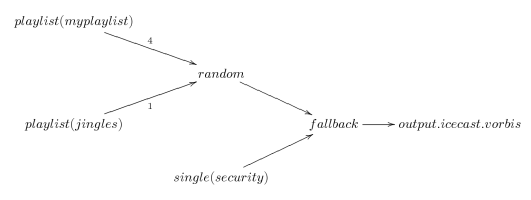
In this section, we build a basic radio station that plays songs randomly chosen from a playlist, adds a few jingles (more or less one every four songs), and output an Ogg Vorbis stream to an Icecast server.
Before reading the script, it helps to visualize the streaming process with the diagram below. Audio flows through it following the arrows. The nodes (fallback and random) select one of the incoming streams and relay it. The final node output.icecast actively pulls data out of the graph and sends it out.
#!/usr/bin/liquidsoap
# Log dir
log.file.path.set("/tmp/basic-radio.log")

# Music
myplaylist = playlist("~/radio/music.m3u")

# Some jingles
jingles = playlist("~/radio/jingles.m3u")

# If something goes wrong, we'll play this
security = single("~/radio/sounds/default.ogg")

# Start building the feed with music
radio = myplaylist

# Now add some jingles
radio = random([jingles.{weight = 1}, radio.{weight = 4}])

# And finally the security
radio = fallback([radio, security])

# Stream it out
output.icecast(
 %vorbis,
 host="localhost",
 port=8000,
 password="hackme",
 mount="basic-radio.ogg",
 radio
)
What's next?
You can first have a look at a more complex example. For a deeper treatment of the language and its uses, see the Liquidsoap book.
You should definitely learn how to get help. If you know enough liquidsoap for your use, you'll only need to refer to the scripting reference, or see the cookbook. At some point, you might read more about Liquidsoap's scripting language. For a better understanding of liquidsoap, it is also useful to read a bit about the notions of sources and requests.